
WC3Connect: Difference between revisions
imported>Unitil Account Creation |
imported>Unitil No edit summary |
||
| Line 8: | Line 8: | ||
==Setup== | ==Setup== | ||
{| class="article=table" | |||
|- | |||
! scope="row" colspan="3" | WC3Connect Download Links | |||
|- | |||
| [https://entgaming.net/wc3connect.exe Windows] | |||
| [https://entgaming.net/wc3connect-osx.zip Macintosh] | |||
| [https://entgaming.net/wc3connect-amd64 Linux] | |||
|} | |||
=== Prerequisites === | === Prerequisites === | ||
{| class="article=table" | {| class="article=table" | ||
| Line 17: | Line 25: | ||
|1.30.1.10211 | |1.30.1.10211 | ||
|} | |} | ||
==How-To Guides== | ==How-To Guides== | ||
<div class="mw-collapsible mw-collapsed" style="width:100%" style="height:auto"> | <div class="mw-collapsible mw-collapsed" style="width:100%" style="height:auto"> | ||
====Account Creation==== | ====Account Creation==== | ||
<hr/> | <hr/> | ||
<div class="mw-collapsible-content"> | <div class="mw-collapsible-content"> | ||
| Line 42: | Line 53: | ||
<div class="mw-collapsible mw-collapsed" style="width:100%" style="height:auto"> | <div class="mw-collapsible mw-collapsed" style="width:100%" style="height:auto"> | ||
=== | ====Joining A Game==== | ||
<hr/> | <hr/> | ||
<div class="mw-collapsible-content"> | <div class="mw-collapsible-content"> | ||
# Open WC3Connect | |||
# Login using your existing username and password | |||
#* If you do not have an account, follow the '''Account Creation''' steps listed above. | |||
# Select your desired game from the available games list(s). | |||
<hr/> | <hr/> | ||
</div> | </div> | ||
Revision as of 03:09, 17 October 2018
WC3Connect
Standalone app used to connect your Warcraft III client to multiple communities.
Advantages
- Join Games Easier: All that is required is for you to create an account, and select a game listed within the WC3Connect client. After, launch your Warcraft III game and navigate to the LAN menu to join your desired lobby.
- Reduces chance of disconnection: WC3Connect gives you GProxy++ support, meaning that you can reconnect to games if your Internet connection briefly disconnects.
Setup
| WC3Connect Download Links | ||
|---|---|---|
| Windows | Macintosh | Linux |
Prerequisites
| WC3 Expansion: | Warcraft III:The Frozen Throne |
| Patch Version: | 1.30.1.10211 |
How-To Guides
Account Creation
| NOTE: If you had an ENT Gaming forum account prior to Oct.14 2018, then use your forum login credentials to log in. |
- Insert your desired username
- Insert your desired password
- Click Sign Up
- If the account is available, you'll be prompted that the account creation was successful (See Figure 2)
- If the account is unavailable, you'll be prompted that the username is unavailable (See Figure 3)
Below is an overview of the signup process:
-
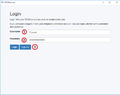 Figure 1
 -
 Figure 2
 -
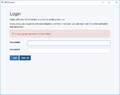 Figure 3


Joining A Game
- Open WC3Connect
- Login using your existing username and password
- If you do not have an account, follow the Account Creation steps listed above.
- Select your desired game from the available games list(s).